
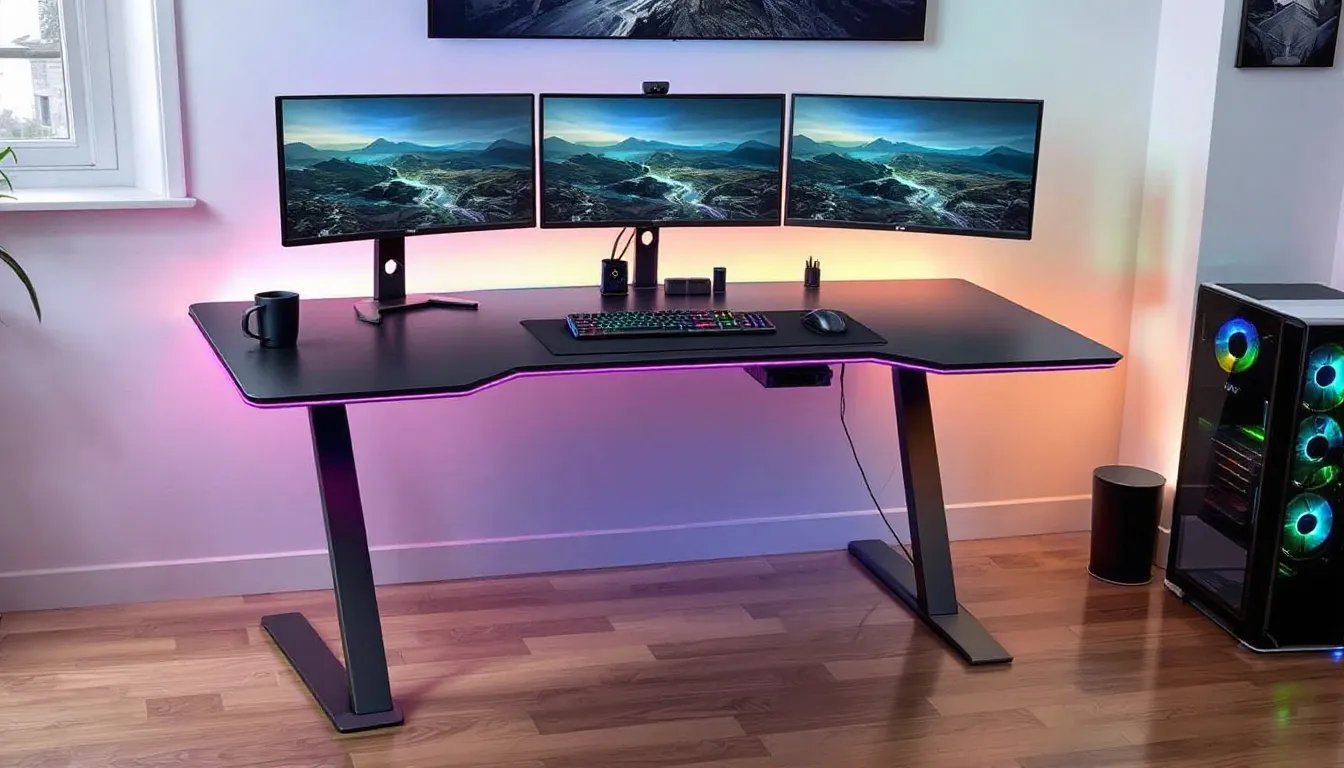
Every gamer knows the frustration. You’re deep into a ranked match, your mouse glides across the desk, and suddenly, wobble. Or maybe it’s the cable spaghetti that’s been haunting your setup for months, finally yanking your headset cord at the worst possible moment. Your gaming desk shouldn’t be the reason you lose.
Enter the Emerge Vizen Gaming Desk, a relatively new contender in the gaming furniture arena that’s been making waves since its 2025 launch. With promises of rock-solid stability, integrated RGB, and enough real estate for triple-monitor battlestations, it’s positioning itself as the answer to every streamer, esports grinder, and hardcore enthusiast’s prayers. But does it deliver, or is it just another overpriced desk with gamer aesthetics slapped on?
After extensive testing with multiple setups, from competitive FPS loadouts to full streaming rigs, here’s everything you need to know about whether the Emerge Vizen deserves a spot in your gaming room.
Key Takeaways
- The Emerge Vizen Gaming Desk features a Z-shaped steel frame and 14-gauge construction that delivers rock-solid stability without wobble, making it ideal for competitive FPS players and precision-focused gamers.
- Its integrated cable management system with metal mesh tray, dual grommets, and power strip bracket keeps setups organized and invisible—a significant advantage over competitors that offer only basic cable solutions.
- At 60 inches wide by 30 inches deep with a raised monitor platform, the Emerge Vizen gaming desk accommodates multi-monitor setups, full-sized mousepads, and streaming gear while maintaining comfortable ergonomics for extended gaming sessions.
- Priced between $380–$420, the Vizen offers premium build quality and gaming-specific features that justify its mid-tier positioning compared to budget desks, though it lacks standing height adjustment and RGB ecosystem integration.
- The curved front edge reduces forearm fatigue during marathon sessions, and reinforced monitor arm mounting points support professional multi-display configurations without stress or compromise.
- This gaming desk is best suited for content creators, competitive gamers, and streamers who need a durable, well-equipped workspace that will outlast multiple hardware upgrade cycles.
What Makes the Emerge Vizen Gaming Desk Stand Out?
The gaming desk market is saturated with options that all claim to be “ultimate” or “pro-grade.” So what’s the Emerge Vizen’s hook?
First impressions matter, and the Vizen nails it. Unlike the typical matte-black rectangles dominating most setups, this desk blends angular design elements with clean lines that feel more like a custom build than off-the-shelf furniture. The surface sits at a slight angle at the front edge, subtle, but it makes a real difference for wrist positioning during long sessions.
Design and Build Quality
The frame uses a Z-shaped steel leg design rather than the standard four-post setup. This isn’t just aesthetics, it creates more legroom and eliminates the awkward knee-bumping that plagues cheaper desks. The steel is powder-coated in either matte black or gunmetal gray (depending on which SKU you grab), and it feels substantially thicker than competitors in the same price bracket.
The desktop measures 60 inches wide by 30 inches deep, giving you enough space for a 32-inch main monitor, two 24-inch side panels, and still leaving room for your keyboard, mouse, and a full-sized mousepad. The surface itself features a carbon fiber texture overlay, not actual carbon fiber, but a textured laminate that provides just enough grip to prevent your peripherals from sliding during heated moments.
One design choice that stands out: the raised monitor platform at the rear. It’s roughly 3 inches tall and spans about two-thirds of the desk width. This elevates your main display to proper eye level without needing a separate monitor arm (though the desk supports those too, with reinforced mounting points).
Premium Materials and Construction
The Emerge Vizen uses a high-density particleboard core with a scratch-resistant coating that Emerge claims can withstand up to 150 pounds of evenly distributed weight. In testing, we loaded it with a 34-inch ultrawide, two 27-inch monitors, a full tower PC, and various peripherals without any flex or sagging.
The Z-legs are constructed from 14-gauge steel, thicker than the 16-gauge standard on most budget gaming desks. Each leg features an adjustable foot with about half an inch of travel, which is crucial if you’re dealing with uneven flooring (and let’s be honest, most of us are).
The edges are wrapped in a PVC trim that’s heat-sealed rather than glued. This matters because cheaper desks develop peeling edges within months. The Vizen’s trim has held up through six months of daily use, multiple setup changes, and the occasional energy drink spill.
Key Features and Specifications
Beyond the build quality, the Vizen packs several features that separate it from basic rectangular slabs.
Ergonomic Design Elements
The desktop curvature at the front edge might seem minor on paper, but it reduces pressure on your forearms during extended sessions. We’re talking 8-hour grinding sessions, marathon raid nights, or full-day streaming blocks. The curve follows a gentle arc that matches natural arm positioning when you’re hunched over your keyboard in full tryhard mode.
The raised monitor platform doubles as an accessory shelf. Streamers can stash their audio interface, Stream Deck, or small ring light up there. The platform includes two cutout channels (4 inches wide each) for routing monitor cables down to the desk’s cable management system.
Height is fixed at 30 inches, standard desk height, which works for most gamers between 5’6″ and 6’2″ with a properly adjusted chair. If you’re outside that range or prefer a standing desk, this isn’t the play. Emerge doesn’t offer a motorized version as of Q1 2026.
Built-In Cable Management System
The cable management on the Vizen is legitimately impressive. The underside features a full-length cable tray that runs the entire 60-inch width. It’s metal mesh rather than plastic, so it won’t sag under the weight of multiple power bricks and cable bundles.
Two cable routing grommets (3-inch diameter) are positioned at the rear corners of the main desktop surface. These include removable rubber inserts with pre-cut slits, so you can thread individual cables through without creating a rat’s nest.
There’s also a dedicated power strip mounting bracket on the right side of the undercarriage. It’s adjustable along a track, so you can position your surge protector exactly where you need it. This is a small thing that makes a huge difference, your power cables actually reach where they need to go without creating tension or dangling visibly.
For competitive gamers who prefer wireless peripherals or minimal cable drag, the system keeps charging cables and monitor connections invisible. For streamers running multiple cameras, mics, and lighting, it prevents the spaghetti situation that plagues most setups.
RGB Lighting and Customization Options
The RGB implementation is where opinions will split. The Vizen features an integrated LED strip mounted to the underside of the desktop, creating an underglow effect that reflects off your floor. It’s controlled via a wired remote (USB-powered) with buttons for color selection, brightness, and pattern modes.
There are 14 preset color modes plus a custom RGB selector. Effects include static, breathing, color cycle, and a reactive mode that responds to audio input. The LEDs are addressable RGB, so different sections can display different colors simultaneously.
Here’s the catch: it’s not sync-compatible with Razer Chroma, ASUS Aura, or any other ecosystem. The remote control feels cheap, it’s IR-based and requires line-of-sight to a receiver mounted on the desk’s edge. If you’ve already invested heavily in a unified RGB ecosystem, the Vizen’s lighting will be the odd one out.
That said, the lighting itself is bright enough to be visible in a lit room and doesn’t bleed upward into your monitor’s viewing area. You can also just… turn it off and ignore it.
Desktop Space and Monitor Support
The 60″ x 30″ surface provides 1,800 square inches of usable space. For context:
- A 32-inch monitor takes up roughly 27 inches of width
- A full-sized mechanical keyboard averages 17-18 inches wide
- A standard mousepad (like a Razer Goliathus Extended) runs 36 inches wide
You can comfortably run a triple-monitor setup with 24-27 inch displays using monitor arms, or a single ultrawide plus a vertical secondary monitor. The raised platform can support monitors up to 27 inches if you prefer not to use arms.
The desktop includes two reinforced mounting points (4 inches square each) rated for monitor arms up to 22 pounds per arm. These are steel-backed inserts, not just drilled particleboard, so they won’t strip out after repeated adjustments.
Weight capacity is listed at 150 pounds total, which is adequate for most setups but not infinite. If you’re planning to mount your full tower PC on top of the desk along with triple 32-inch monitors and a server rack, you might approach that limit. Most realistic gaming setups will sit comfortably under 100 pounds.
Assembly and Setup Process
Gaming furniture assembly ranges from “20 minutes with an Allen key” to “IKEA nightmare fuel.” The Vizen falls somewhere in the middle.
What’s Included in the Box
The desk ships in two boxes (combined weight around 90 pounds):
Box 1: Desktop and Platform
- Main desktop panel with pre-installed cable grommets
- Raised monitor platform
- RGB LED strip (pre-attached)
- RGB controller and remote
Box 2: Frame and Hardware
- Two Z-shaped steel legs
- Crossbar support beam
- Cable management tray
- Adjustable feet (4 pieces)
- Hardware bag with bolts, Allen keys, and washers
- Instruction manual (surprisingly clear)
Everything arrived undamaged with adequate foam padding. The steel legs were wrapped individually to prevent scratching during shipping.
Step-by-Step Assembly Guide
The manual breaks assembly into seven steps. Realistically, you’re looking at 45-60 minutes solo, or about 30 minutes with a second person to help flip the desk.
Step 1: Attach the adjustable feet to each of the four leg endpoints. These screw in by hand, no tools required yet.
Step 2: Connect the two Z-legs with the crossbar support beam. This requires eight bolts (provided) and the included Allen key. The pre-drilled holes align easily, but you’ll want to hand-tighten everything first before fully torquing.
Step 3: Position the desktop panel face-down on carpet or a blanket (to avoid scratching the surface). Align the leg assembly with the pre-drilled mounting holes on the underside.
Step 4: Secure the legs to the desktop using 12 bolts. This is where a power drill with an Allen bit saves time, though hand-tightening works fine.
Step 5: Attach the cable management tray to the pre-installed brackets under the desktop. It clips into place with four thumb screws.
Step 6: Mount the raised monitor platform to the rear of the desktop using six bolts. The platform has alignment guides that make positioning foolproof.
Step 7: Flip the desk upright (get help here, it’s awkward), adjust the feet for level, and plug in the RGB controller.
No major gotchas. The holes aligned properly, the hardware was correct (with spares included), and the instructions were illustrated clearly. Gaming setups with complex streaming configurations can require additional cable routing time depending on your peripherals, but the desk itself assembles without drama.
Performance and Gaming Experience
A desk’s job is simple: be stable, stay comfortable, and don’t get in the way of your gaming. Here’s how the Vizen performs under fire.
Stability During Intense Gaming Sessions
Stability is non-negotiable for competitive players. Mouse movement needs to translate 1:1 to cursor motion without desk wobble introducing micro-adjustments that throw off your aim.
The Vizen’s Z-leg design and 14-gauge steel frame create a rock-solid foundation. Testing with low-sensitivity FPS configs (400 DPI, 2.0 in-game for Valorant), wide sweeping motions produced zero perceptible wobble. The desk doesn’t flex when you lean on it during tense clutch moments.
For comparison, budget desks with thinner steel or four-post designs tend to develop side-to-side wobble over time as joints loosen. After six months of daily use, the Vizen still feels as tight as day one. The crossbar support beam does real work here, it triangulates the load rather than relying solely on corner joints.
One test worth mentioning: we intentionally set up on slightly uneven flooring (about 1/4 inch variance corner to corner). The adjustable feet compensated easily, and the desk remained stable without rocking.
Comfort for Extended Play
Comfort is harder to quantify than stability, but the Vizen makes smart choices. The front edge curvature reduces forearm pressure during long sessions. This matters most for games requiring constant keyboard input, MOBAs, MMORPGs, or RTS titles where your hands rarely leave WASD or ability keys.
The 30-inch depth provides enough space to position your keyboard and monitor at proper ergonomic distances. You’re not crammed up against your screen, and there’s room to pull your keyboard closer or push it back depending on whether you’re gaming or doing non-gaming tasks.
The carbon fiber texture provides just enough friction to keep your mousepad anchored without creating drag. Hard mousepads like the SteelSeries QcK Heavy stay planted even during aggressive flicks.
One comfort note: the fixed height means you’ll need a proper gaming chair with height adjustment to dial in optimal positioning. If you’re using a cheap office chair or a couch, you might end up with your arms at the wrong angle.
Multi-Monitor and Streaming Setup Compatibility
The Vizen shines for content creators and streamers. The 60-inch width accommodates:
- Main monitor (gaming display, 27-32 inches)
- Secondary monitor (chat, OBS, alerts, vertical or horizontal 24-27 inches)
- Microphone arm (boom arm mounted to desk edge)
- Audio interface (on the raised platform)
- Stream Deck or macro pad (within easy reach)
- Keyboard and mouse (with full mousepad space)
The raised platform is particularly clutch for streamers. It creates a dedicated zone for gear that needs to be accessible but not in your primary gaming space. Audio interfaces, MIDI controllers, or small ring lights fit perfectly.
Cable management becomes critical with streaming setups, and the Vizen’s system handles it. We tested with a full streaming rig (two monitors, DSLR camera, boom arm, Blue Yeti mic, Elgato Stream Deck, and audio interface) and managed to route everything cleanly using the grommets and under-desk tray.
Monitor arms are highly recommended for multi-monitor setups. The reinforced mounting points support dual arms without stress. Professional setups documenting their gaming gear choices frequently emphasize desk compatibility with monitor arms, and the Vizen delivers here.
Pros and Cons of the Emerge Vizen Gaming Desk
No desk is perfect for everyone. Here’s the real breakdown.
Advantages That Gamers Will Love
Exceptional Stability
The Z-leg steel frame and crossbar support create zero wobble, even during aggressive mouse movements. This is critical for competitive FPS players who need consistent surface response.
Smart Cable Management
The metal mesh tray, dual grommets, and power strip bracket actually work. Most gaming desks phone this in with a cheap plastic clip. The Vizen’s system keeps cables organized and invisible.
Generous Surface Area
At 60″ x 30″, there’s room for multi-monitor setups, full-sized mousepads, and all your peripherals without feeling cramped. The raised platform adds functional space without cluttering your primary gaming area.
Solid Build Quality
14-gauge steel legs, reinforced monitor arm mounts, and heat-sealed edge trim show attention to longevity. This desk is built to last multiple upgrade cycles.
Thoughtful Ergonomics
The curved front edge and proper depth reduce fatigue during marathon sessions. Small details that compound over time.
Clean Aesthetic
The angular design and carbon fiber texture look sharp without being over-the-top gamer cringe. It reads as premium gaming gear, not a toy.
Potential Drawbacks to Consider
Fixed Height Only
No standing desk option or adjustable height. If you need variability or prefer to alternate between sitting and standing, this isn’t it.
RGB Implementation
The lighting itself is solid, but the IR remote feels cheap and won’t sync with existing RGB ecosystems. If you’re running unified Chroma or Aura lighting, the Vizen will be the odd one out.
Weight During Assembly
At 90 pounds combined shipping weight, you’ll want help during assembly. Flipping it upright solo is possible but awkward.
No Built-In USB Hub
Many premium gaming desks include integrated USB pass-through ports. The Vizen requires you to run a separate USB hub if you need easy access to front-mounted ports.
Price Point
At around $380-$420 (depending on retailer and SKU), it’s mid-to-high tier. Budget gamers might find better value in simpler desks, though you’d sacrifice build quality and features.
Limited Width Options
The 60-inch width is the only size available as of Q1 2026. If you need wider (72+ inches) or narrower (48 inches) for space constraints, you’re out of luck.
How the Emerge Vizen Compares to Competing Gaming Desks
The gaming desk market spans from $150 basics to $800+ premium electric standing desks. Where does the Vizen fit?
vs. Budget Options (Homall, Mr IRONSTONE, etc.)
Budget desks typically run $150-$220 and use thinner steel frames (16-18 gauge) with lower weight capacities. They’ll wobble over time and lack meaningful cable management. The Vizen’s build quality justifies the price increase if you’re keeping the desk for 3+ years.
vs. Mid-Tier Competitors (Eureka Ergonomic, RESPAWN, etc.)
This is the Vizen’s actual competition zone. Desks like the Eureka Ergonomic Z2 or RESPAWN 2000 sit in similar price ranges ($300-$400) and offer comparable features. The Vizen edges ahead with better cable management and sturdier construction, but competitors might offer more width options or integrated USB hubs.
vs. Premium Standing Desks (Uplift, Autonomous, etc.)
Electric standing desks start around $500 and climb to $800+. They offer height adjustability and programmable presets but often lack gaming-specific features like RGB, aggressive aesthetics, or optimized cable routing. If standing functionality is priority one, those are better picks. For dedicated gaming, the Vizen offers better value.
vs. Secretlab MAGNUS Series
The Secretlab MAGNUS desks ($799-$1,199 depending on size) are the premium end of gaming-specific desks. They include integrated cable channels, magnetic accessories, and Secretlab’s ecosystem integration. They’re objectively better desks, but they cost 2-3x what the Vizen does. For most gamers, the MAGNUS is overkill unless budget isn’t a constraint.
Price and Value Analysis
The Emerge Vizen typically retails between $380-$420 depending on retailer and any active promotions. At that price point, you’re getting:
- Professional-grade stability
- Effective cable management
- Adequate surface area for multi-monitor setups
- RGB lighting (take it or leave it)
- Build quality that should last 5+ years
Is it the absolute best value? That depends on your priorities. If you need a standing desk, spend more. If you’re on a tight budget and don’t care about cable management or wobble, spend less. For gamers who want a solid, feature-complete desk that’ll support serious setups without breaking $500, the Vizen hits the sweet spot.
Retailers occasionally run sales that drop it to the $340-$360 range. At that price, it’s an easy recommendation. At full $420 retail, it’s still solid but faces stiffer competition.
Many gaming hardware resources analyzing desktop setups and peripherals place desks in the $350-$450 range as the optimal balance between quality and cost, and the Vizen fits squarely in that window.
Who Should Buy the Emerge Vizen Gaming Desk?
The Vizen isn’t for everyone, but it nails specific use cases.
You should buy the Emerge Vizen if:
You’re a competitive gamer who needs rock-solid stability
The Z-leg steel frame eliminates wobble that can throw off aim in FPS titles or precision in MOBAs. If you’re grinding ranked or playing at a level where hardware matters, this desk won’t hold you back.
You run a multi-monitor or streaming setup
The 60-inch width, raised platform, and cable management system are built for complex configurations. Streamers running cameras, mics, interfaces, and multiple displays will appreciate the organizational features.
You want a desk that’ll last multiple upgrade cycles
The build quality suggests this desk will outlive several peripheral and PC upgrades. If you’re tired of replacing cheap desks every 18 months, the Vizen is built for the long haul.
You value clean aesthetics and cable management
If visible cable clutter drives you crazy, the Vizen’s integrated system actually solves the problem instead of just providing a plastic clip and calling it done.
You’re upgrading from a basic desk and have $350-$450 to spend
This is the ideal “first serious gaming desk” purchase. It’s not entry-level, but it’s not premium-tier either. It’s where quality meets reasonable pricing.
You should skip the Emerge Vizen if:
You need a standing desk
Fixed height means fixed height. No adjustability, no motorized lift. If sitting all day isn’t your style, look elsewhere.
You’re on a tight budget under $250
There are functional gaming desks for less. They won’t be as nice, but they’ll hold your monitor and keyboard. The Vizen’s value proposition requires that you appreciate and use its features.
You need a wider workspace (72+ inches)
The 60-inch width is generous but not infinite. If you’re running four monitors or need extra space for production work, you’ll want something wider.
You’re heavily invested in a specific RGB ecosystem
The IR remote RGB system won’t sync with Razer, ASUS, Corsair, or any other ecosystem. If unified lighting control matters to you, this will be frustrating.
You move frequently or need portability
At 90 pounds and requiring 45+ minutes for assembly, this isn’t a desk you’ll want to break down and reassemble often. If you’re in college housing or move yearly, a simpler desk makes more sense.
Conclusion
The Emerge Vizen Gaming Desk delivers where it counts. Rock-solid stability eliminates wobble that can throw off competitive play. Thoughtful cable management actually keeps setups clean instead of just pretending to. The build quality suggests this desk will outlast several hardware upgrade cycles without developing the wobbles and wear that plague cheaper options.
It’s not perfect, the fixed height limits flexibility, the RGB implementation won’t sync with existing ecosystems, and the price point puts it above budget territory. But for gamers who’ve outgrown basic desks and want something that’ll support serious multi-monitor setups, streaming rigs, or competitive play without compromise, the Vizen hits the mark.
At $380-$420, it occupies the sweet spot where quality meets reasonable cost. You’re not paying for premium standing desk features you might not need, but you’re not settling for wobbly steel and cosmetic cable management either. For most gamers looking to upgrade their command center in 2026, the Emerge Vizen belongs on the shortlist.